
The following instructions are for all Macintosh computers running
operating systems 8.1 and higher.
(It may also work with 7.6.1)
1. Go to the Apple menu, down to Control Panels and follow the arrow over and down to TCP/IP.
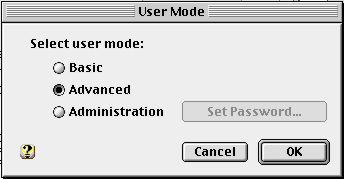
2. Go to the Edit menu and select User Mode...Click on the Advanced button. Click OK.
3. Now click on the Info button (back at the TCP/IP window) to
see detailed network information.
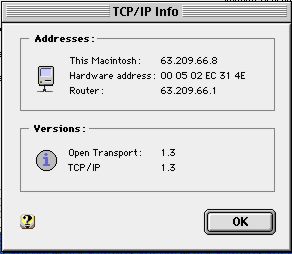
The hardware address is the same as the ‘MAC’ (Media Access Control)
address.
If you have any questions or problems with this process please
call
Mike Mullen (MacMentor) at 310-455-7755
Or you can e-mail him at mike@macmentor.com