iMac / OS 8.5 PPP Troubleshooting
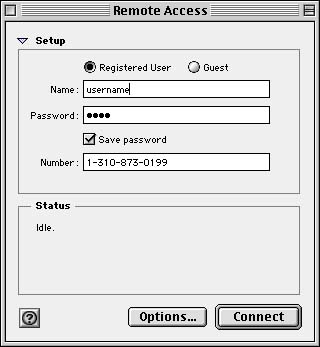
The most common problem with PPP and TCP/IP on the iMac and Mac OS 8.5 are the Remote Access Control Panel settings. The Remote Access Control Panel was called PPP in previous versions of the Mac OS. (8.1 and earlier) The term PPP is now found only in the settings of the Remote Access Control Panel and the TCP/IP Control Panel. Since Remote Access can utilize the dial-up feature on the Mac in various ways, it is easy for them to be set improperly when dialing into the Internet.
Note: Any Mac that ships with Mac OS 8.5 does NOT need to install the Netwood MacPack. All necessary software to go online is already installed.
To check what OS is being used on a Mac, have the user switch to the Finder using the upper right menu then select the first choice under the Apple menu where it says "About This Computer..."
The following are some settings that you might find useful to ensure a good dial-up connection at Netwood Communications' ISP:
To get here: Apple menu / Control Panels / Remote Access
Be sure you have a "1" and "310" set in your dial-up phone number!
At the Remote Access Control Panel,
Click the Options button. Click the Protocol button.
(items in red do not appear on user's screen)
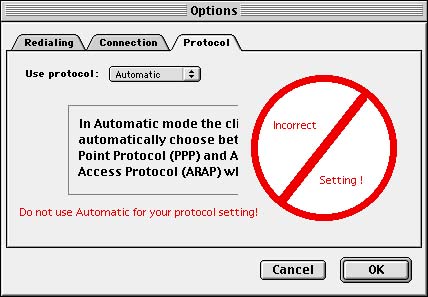

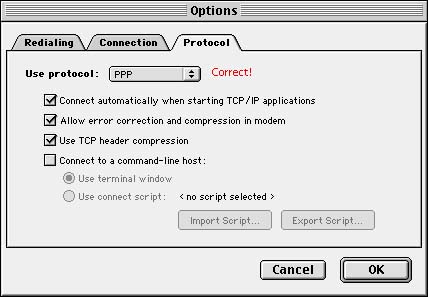
Make sure PPP is selected for the Protocol setting.
If the user is getting no response from their modem, have them go to the Modem Control Panel.
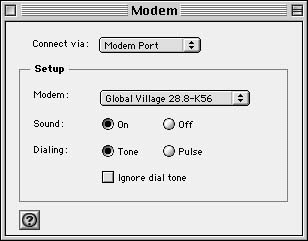
To get here: Apple Menu / Control Panels / Modem
Are you set to the right modem and port? iMacs have an internal modem so the above settings would be wrong. It is very rare that a user would connect their modem to the Printer port. If it is a non-iMac (any PowerMac with Mac OS 8.5 installed) with an external modem, the setting will always be the Modem Port.

Both IP addresses should be input. The user can input the second IP by pressing the Return key on the keyboard after typing in the first IP address.